Persistent Agent Memory: A Three-Tier Architecture
Agents that forget everything between turns can't coordinate, can't learn, and can't improve. Here's the 3-tier memory model, global, agent-specific, session, and how we kept it fast, auditable, and privacy-safe.

When we started BUCC, the core question wasn't "which LLM should we use" or "how do we route tasks." It was: How do we make agents that learn?
Because every AI system you interact with today, Claude, ChatGPT, the latest o1 variant, starts from zero on each conversation. You can give it context. You can provide instructions. But the moment the chat ends, all of it's gone. The model didn't learn anything. It has no memory of you, no continuity, no ability to compound knowledge.
That's fine for chatbots. It's crippling for agents.
The Problem: Why RAG Isn't Enough
Retrieval-Augmented Generation (RAG) is the standard response to this problem. You build a vector database, embed documents, search semantically for relevant context, and inject it into the prompt.
It works. It's better than nothing. But it's not memory.
Here's the difference:
- Retrieval answers: "What documents are similar to this query?"
- Memory answers: "What have I learned? What patterns have I noticed? What do I know about how this domain works?"
RAG treats everything as external documents, a knowledge base you're searching through. Memory treats knowledge as something the agent itself builds, refines, and connects across time.
In a multi-agent system, the gap becomes obvious. When Agent A completes a research task and Agent B needs to use those findings, RAG can find the documents. But memory would let Agent B understand the context around those findings, the reasoning, the confidence level, what questions remain open, what assumptions were tested.
RAG is a retrieval tool. Memory is the difference between having reference materials and having wisdom.
The Three-Tier Memory System
We built BUCC's memory layer with three distinct tiers, each serving a different purpose.
Tier 1: Global Memory
This is your company's shared institutional knowledge. The stuff every agent needs to know.
- Brand voice guidelines and tone examples
- User preferences and operational context
- Standard operating procedures
- Decision-making frameworks
- Approved API endpoints and data sources
- Historical decisions and their rationales
Tier 1 is read-only to agents (writes require human approval) and auto-loaded on every agent startup. There's no search cost, no latency, it's always available. When a new agent spins up, it instantly knows the company's values, constraints, and patterns.
In practice, Tier 1 acts as a constitutional constraint. It's not a suggestion. It's the foundation every agent builds on.
Tier 2: Agent-Specific Memory
This is where an individual agent accumulates domain expertise over time.
The financial analyst builds Tier 2 memories about revenue patterns, CFO decision-making styles, budget cycle timings, and vendor performance. The writer collects voice patterns, audience insights, and editorial preferences. The security lead learns about the threat landscape specific to your infrastructure.
Tier 2 is scoped. Another agent doesn't read it by default, it would be noise. But it's discoverable. If Agent A needs expertise from Agent B, it can request it. The system maintains a clear audit trail of which memories were accessed and why.
Tier 2 memories are editable. An agent can refine its own memory, and humans can correct it if it's wrong. This is crucial. Unlike an LLM's training data (which is frozen), agent memory is live and mutable.
Tier 3: Session Memory
Ephemeral context for a single task execution.
When an agent is working on a task, it accumulates in-progress context: intermediate findings, partial analyses, decision trees, dead ends. This clutter is useful during the task but noise afterward.
Tier 3 is automatically archived when a task completes. But the archive is searchable. So if the same agent tackles a similar problem next month, it can say: "I solved something like this before. Let me find how."
Tier 3 also serves as a safety valve. If an agent starts hallucinating mid-task, the session context is isolated. It won't pollute the permanent memory tiers.
Memory Lifecycle: Create, Search, Update, Archive
An agent's memory follows a clear lifecycle:
Create: Agent encounters something noteworthy (a client preference, a market shift, a technical insight). It writes to the appropriate tier. Tier 1 writes are blocked unless human-approved. Tier 2 writes are logged and attributed. Tier 3 writes are ephemeral.
Search: Any time an agent has a question, "How have we handled this before?" or "What did the research team learn about this?", it queries the memory system. Searches are semantic (vector-based) and metadata-filtered (by agent, by date, by confidence level).
Update: Agents refine their own memories over time. An initial uncertainty becomes confidence as more evidence accumulates. A strategy that didn't work gets tagged with why. This iterative refinement is where memory becomes knowledge.
Archive: Session context auto-archives. Long-term memory can be archived manually (marked as historical). Archived memories stay searchable but don't load into active agent context.
Cross-Agent Memory: Controlled Knowledge Sharing
The real innovation in BUCC's memory system isn't the tiers, it's how agents access each other's memories.
Naive approach: Every agent reads every other agent's Tier 2. This causes hallucination. Agent C will read something Agent A learned out of context, miss the nuance, and build on a misunderstanding.
Our approach: Explicit read policies.
When the writer needs findings from the researcher, it doesn't get raw Tier 2 dumps. It requests them, and the request is logged. The researcher's Tier 2 findings are presented with provenance: who recorded this, when, with what confidence level, under what assumptions.
The CEO dashboard pulls insights from multiple agents, but it synthesizes them first. Raw agent memories don't bleed into the exec summary.
The security lead gets automatic feeds of threat intelligence from the OSINT agent, but it's filtered and de-noised before delivery.
This is controlled knowledge sharing. It's the opposite of a shared brain where every neuron fires constantly. It's more like a well-run organization where information flows through established channels and people understand context before acting on new data.
The Stack: mem0 + Qdrant + Local Ollama
We could have built the memory system from scratch. The math isn't hard. The challenge is the operational complexity.
Instead, we chose three open-source components:
mem0 is the memory engine. It handles CRUD operations, metadata management, and the query interface. It's designed specifically for AI agents, so it understands things like confidence levels, source attribution, and cross-agent policies.
Qdrant is the vector store. Semantic search at scale. When an agent queries "Have we dealt with price-sensitive customers before?", Qdrant finds relevant memories via vector similarity, not keyword matching.
Ollama (running locally) generates the embeddings. This is the critical part: we're not sending memory data to a third-party embedding API. All embeddings are generated in your own infrastructure.
Why does this matter? Because the Data Sanitization Proxy (more on this tomorrow) sits in front of the embedding pipeline. Sensitive data gets pseudonymized before it's ever converted to vectors. The embedding model never sees the original confidential information.
The stack looks like this:
Agent → Memory Query → DSP (Pseudonymization)
  → Local Ollama (Embedding) → Qdrant (Vector Search)
  → Memory Result → DSP (Rehydration) → Agent
Every memory lookup passes through the DSP twice: once going in (to sanitize queries), once coming out (to restore original data in the output). Sensitive values are replaced with tokens before embedding, guaranteeing they never leak into the vector space.
The UI: Six Tools, One Memory System
The Memory section in BUCC gives you six interfaces into the same underlying system:
1. Long-Term Memory
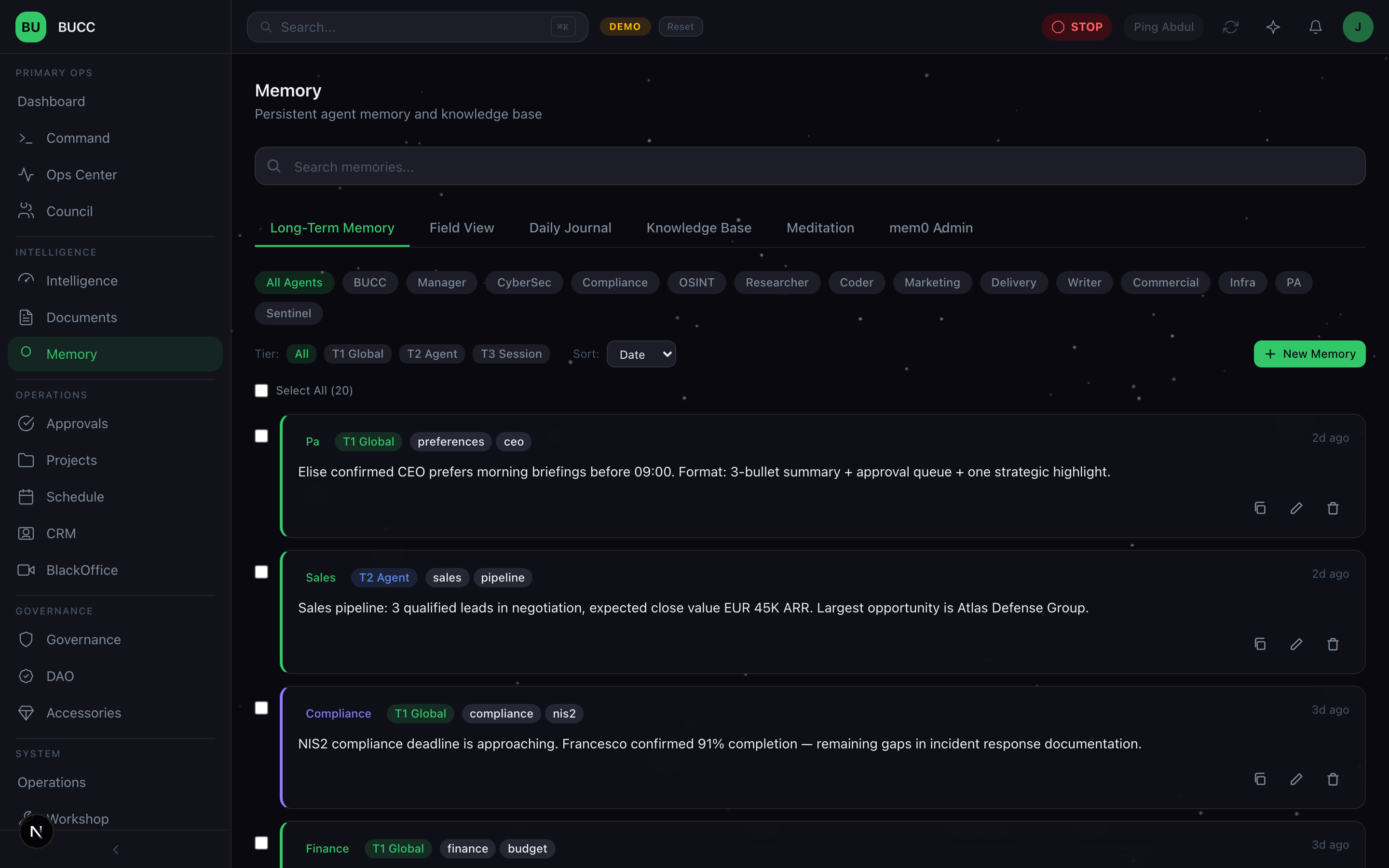
Search all memories across the fleet. Filter by agent, by tier, by date range. See what each agent has learned and how confident it is in that knowledge.
You can tag memories, link them to other memories, and add human annotations. This is your institutional knowledge base, visible, searchable, and auditable.
2. Field View
Click into a memory entry and see it in full context. Who recorded this? When? What was the task? What's the confidence level? Has any other agent since contradicted this? Are there related memories?
Edit directly. Correct mistakes. Add clarifications. The memory system is transparent and human-editable, you're not locked into what the agent wrote.
3. Daily Journal
An automatic summary of what the fleet learned today. No manual logging. As agents create and refine memories, the system generates a digest: "Agent A refined 3 memories about customer pricing. Agent B discovered a new pattern in vendor performance. Agent C confirmed a hypothesis about market timing."
Scan it each morning. Spot trends. Identify gaps. This is your single source of truth for what the fleet knows today that it didn't know yesterday.
4. Knowledge Base
A permanent, curated repository. Unlike Tier 3 sessions (which auto-archive) and Tier 2 (which are agent-scoped), the Knowledge Base is company-wide and persistent.
Use this for:
- Standard operating procedures
- Domain expertise you've learned and want to preserve
- Best practices from past projects
- Approved vendor lists, client preferences, compliance requirements
Upload documents. Import bulk context. Manual curation. This is your reference library.
5. Meditation
A space for agents to reflect, consolidate, and refine their own memories. Think of it as the agent's chance to ask itself: "What did I really learn? What patterns am I seeing? What assumptions should I revisit?"
Humans can guide this process too. You can prompt an agent to consolidate a cluster of related memories, or to resolve contradictions in its own knowledge base.
It sounds abstract, but it's powerful. An agent that spends time consolidating knowledge works better than one that just accumulates experience.
6. mem0 Admin
Direct access to the vector database for engineers and power users. Search embeddings. Check storage usage. Run migrations. Debug retrieval performance. Audit the system at the metal level.
This isn't for the CEO. It's for the team building on BUCC, engineers who need visibility into how the memory layer actually works.
Privacy by Design: All Data Stays On-Premise
Most memory systems for AI agents offload storage to cloud APIs. They call it "scalability." What they mean is: your agent memories live on someone else's servers.
We chose a different trade-off.
All memory, every vector, every metadata entry, every journal, lives in your infrastructure. The Qdrant database runs on-premise. The Ollama embeddings run on-premise. The mem0 engine runs on-premise.
This is deliberate. Your agents' learned context is proprietary. It's how your fleet gets better over time. It's your competitive advantage.
With cloud-hosted memory, you're implicitly trusting:
- The cloud provider doesn't train models on your memories
- The cloud provider's security is solid (no breaches)
- The cloud provider won't suddenly change their pricing or policies
- Regulatory requirements (GDPR, etc.) are met
That's a lot of trust. We decided not to ask for it.
On-premise means:
- Your memories are your responsibility, your security, your backup strategy
- Your retention policies apply (not the vendor's)
- Your audit logs are local
- Your data never needs regulatory clearance for cloud transit
It's also simpler. No API rate limits. No network latency. No "our servers are down, so your agents can't access memory."
Client Integrations: Multiple Tools, One Memory
BUCC's memory system is accessible via MCP (Model Context Protocol). This means IDEs, external tools, and other AI platforms can read and write to the same memory layer.
A developer using VS Code can query the same memory that the BUCC agents use. A researcher using a Jupyter notebook can add findings to the Knowledge Base. An external API can integrate memory lookups into its workflows.
The memory system becomes a shared intelligence backbone. Everyone (humans and agents) benefits from what everyone else has learned.
Lessons Learned: What Went Right, What Was Harder
What went right:
- Tiering worked. The three-tier model prevents both information overload and knowledge fragmentation. Agents stay focused on their domain without losing access to company context.
- Local embeddings were worth the infrastructure cost. Running Ollama locally meant we could add the DSP without performance hits. The slight overhead of pseudonymization is invisible because everything's running in-house.
- Memento-style archival preserved history without polluting present. Session context auto-archives instead of disappearing or cluttering permanent memory. Found memories from 6 months ago without degrading current performance.
What was harder:
- Defining "confidence levels" was subtle. When an agent records a memory, how confident should it be? We settled on: agents propose confidence; humans can override. But determining the right scale (0-100 vs. SURE/LIKELY/UNCERTAIN) took multiple iterations.
- Cross-agent access policies created complexity. We wanted controlled knowledge sharing without permission dialogues slowing things down. The solution: pre-approve read policies (e.g., "writers can always read researcher findings"), then log the access. But defining those policies required understanding the entire fleet first.
- Vector search isn't perfect retrieval. Sometimes semantic similarity misses what you actually meant. We added a hybrid layer: if vector search doesn't find relevant results, fall back to metadata+keyword filtering. This catches edge cases but adds latency.
What's Next
Memory is table stakes. It's how agents move from "useful tool that forgets" to "team member that learns."
But memory + LLM routing is dangerous. Every time an agent queries memory and gets results, it might be pulling sensitive information. Tomorrow we're covering the Data Sanitization Proxy, the layer that sits between memory and every LLM call.
It's the security piece nobody wants to build but everyone needs.
Read it tomorrow.
Filed from the command centre.
Further reading & standards
The choices in this post map directly onto published frameworks and regulations. If you're building against the same constraints, these are the primary sources:
- OWASP LLM06, Sensitive Information Disclosure. The failure mode that classification + fail-closed routing contains. (owasp.org/www-project-top-10-for-large-language-model-applications)
- OWASP LLM08, Excessive Agency. The canonical name for agents doing more than they should. (owasp.org/www-project-top-10-for-large-language-model-applications)
- GDPR, Article 5 (principles) & Article 32 (security of processing). The baseline data-protection regime the DSP is designed to operate inside. (gdpr-info.eu)
Read the rest of the series
- Day 1: Running 25 AI agents in production
- Day 2: Governance, not guardrails
- Day 3: Persistent agent memory (you are here)
- Day 4: The Data Sanitization Proxy
- Day 5: The agent provisioning pipeline
- Day 6: Three-layer LLM routing
- Day 7: Catching AI hallucinations
- Bonus: Agent ACL framework
- Bonus: Agent wallets & DAO governance
- Bonus: BlackOffice video pipeline
- Bonus: Control Debt Scoring